

Article
GTA 5 Browser Version: Features, Requirements and Differences
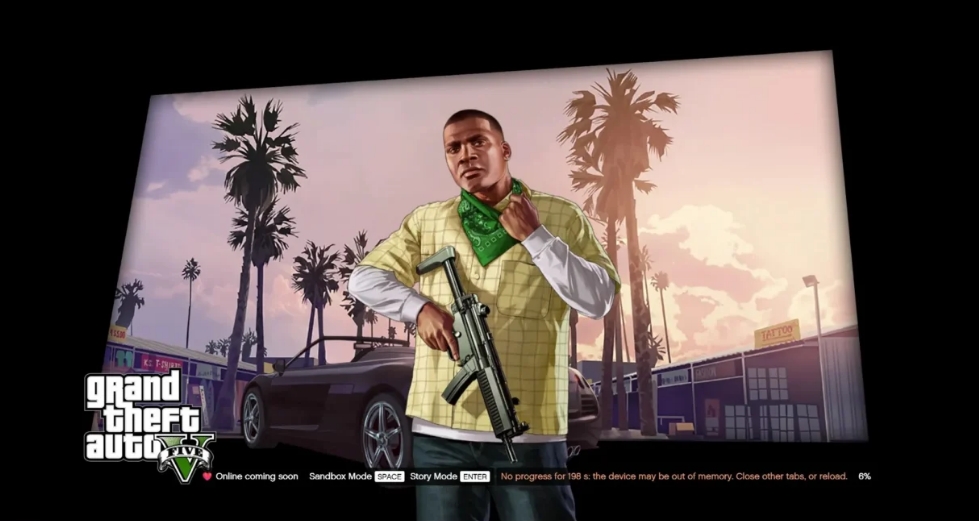
Playing GTA 5 in a browser differs significantly from running an ordinary browser game. Grand Theft Auto V contains a large three-dimensional environment, complex physical interactions, character animations, audio systems, and numerous gameplay resources.
Unofficial browser ports attempt to make these systems accessible through modern web technologies. Unlike cloud gaming, where a remote computer processes gameplay, a WebAssembly-based port uses the player’s own device to execute game logic and render the environment.
This approach makes it possible to launch a compatible version of GTA V within a browser tab without installing the conventional game application.
How GTA 5 Runs in a Browser
Two technologies play particularly important roles in browser-based ports: WebAssembly and WebGPU.
WebAssembly allows compiled software to execute within a browser environment. WebGPU provides access to graphics processing capabilities needed for rendering complex three-dimensional environments.
Together, these technologies allow developers to adapt existing game engines to browser environments.
| Technology | Function |
|---|---|
| WebAssembly | Executes compiled game logic |
| WebGPU | Processes three-dimensional graphics |
| Shared memory | Allows compatible execution threads to exchange data |
| Browser storage | Stores downloaded resources and supported saves |
| Data streaming | Loads game resources when required |
| Hardware acceleration | Allows browser operations to use available graphics hardware |
The browser still needs to download game resources. Consequently, playing without a traditional installation does not mean that the game requires no storage space or downloading.
The first session may involve extended loading, while subsequent sessions can reuse previously stored resources. GitHub+2
Story Mode and Sandbox Mode
Browser adaptations of Grand Theft Auto 5 can include two principal gameplay formats.
| Mode | Description |
|---|---|
| Story Mode | Follows the original campaign with Michael, Franklin and Trevor |
| Sandbox Mode | Provides an alternative environment for free exploration and experimentation |
Story Mode is intended for players interested in narrative missions and character development. Sandbox Mode concentrates on exploring the environment without following the campaign’s normal progression structure.
Depending on the browser build, Sandbox Mode may introduce additional tools, map options, and customization features.
Separate save systems can allow players to experiment in Sandbox Mode without changing their campaign progress.
What Can You Do in GTA V Browser?
The available content depends on how extensively the original game has been adapted.
Supported gameplay can include:
- Exploring Los Santos and surrounding regions.
- Driving different types of vehicles.
- Participating in Story Mode missions.
- Switching between available protagonists.
- Exploring Sandbox Mode environments.
- Using supported character abilities.
- Experimenting with cheat codes.
- Saving progress within the browser.
Players should not assume that every feature of the original GTA 5 works identically in every browser port. Certain missions, animations, audio effects, environmental objects, and gameplay systems may be affected by compatibility issues.
GTA 5 Browser System Requirements
Although the game runs within a browser, its graphics and processing requirements remain considerably higher than those of most lightweight web games.
The following specifications represent a general recommendation rather than universal minimum requirements.
| Component | Recommended configuration |
|---|---|
| Browser | Updated Chrome, Edge or compatible Chromium browser |
| Processor | Modern multi-core processor |
| RAM | 8–16 GB or more |
| Graphics | WebGPU-compatible graphics hardware |
| Internet connection | Stable connection for downloading resources |
| Storage | Sufficient space for cached game data |
| Controls | Keyboard and mouse |
Some builds include low-memory profiles and adjustable graphics settings. These options can help reduce resource consumption, although they cannot compensate for every hardware limitation.
Browser Version vs. Original GTA 5
The original game and unofficial browser adaptations provide different approaches to accessing the same general gameplay concept.
| Feature | Browser port | Original installed game |
|---|---|---|
| Launch method | Browser tab | Installed application |
| Graphics processing | Local hardware through WebGPU | Native graphics system |
| Game storage | Browser cache or local data | Installed game files |
| Save system | Depends on the port | Native save system |
| Mod support | Limited and build-dependent | Extensive community support |
| GTA Online | Not officially integrated | Supported through official editions |
| Stability | Depends on development and compatibility | Established native implementation |
Some experimental browser projects include independent multiplayer systems. These should not be confused with GTA Online, which operates through Rockstar’s official services.
Advantages and Limitations
Potential advantages of the browser version include:
- Launching gameplay without a conventional installation.
- Keeping game resources within a browser environment.
- Accessing alternative Sandbox features.
- Experimenting with compatible graphics settings.
- Using separate save profiles in supported builds.
However, browser ports can also experience rendering errors, incomplete gameplay implementation, loading interruptions, and inconsistent performance.
GTA V Browser represents an unofficial technical adaptation rather than an official browser edition of Grand Theft Auto V. Its functionality depends on the particular build, available resources, and the player’s device.
